

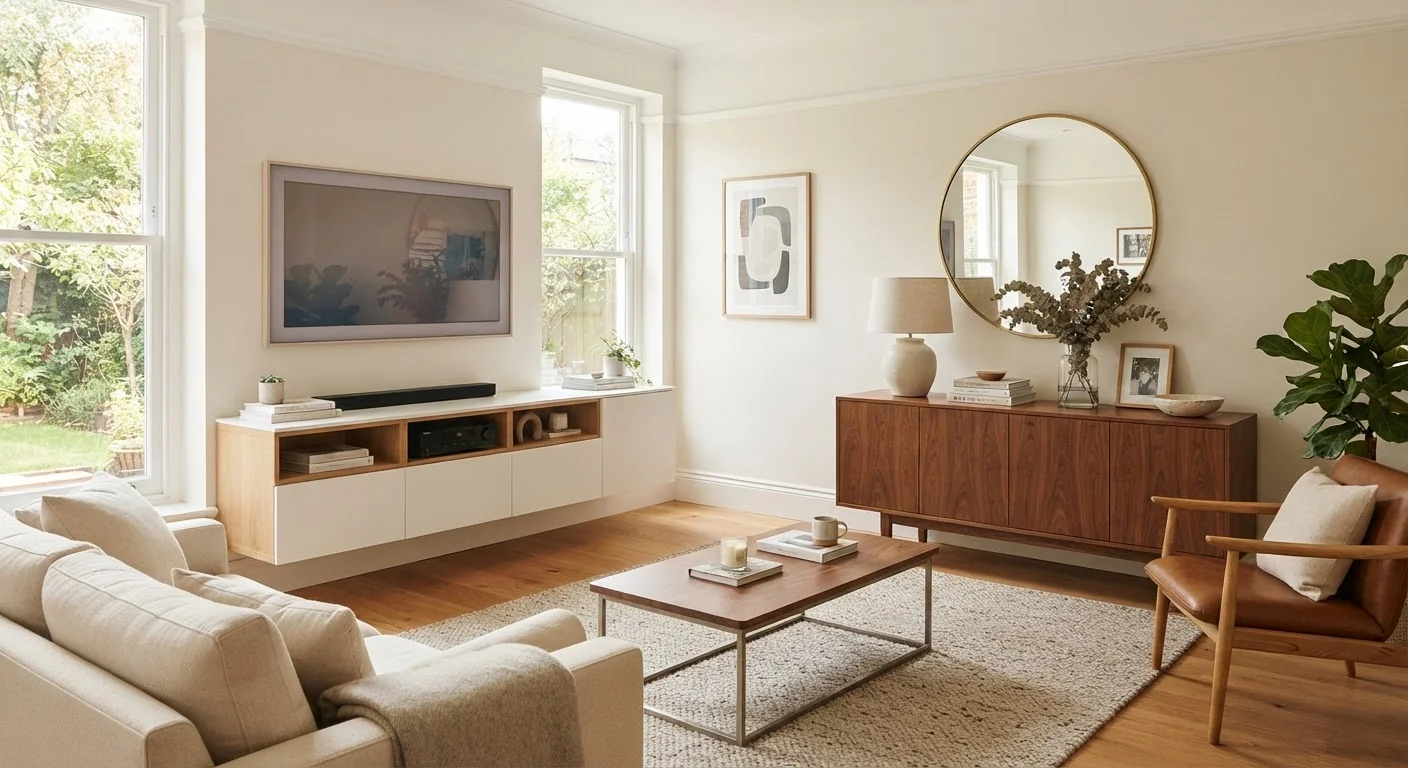
Option A
Media Unit
The purpose-built hub for screens, cables, and AV equipment.
Best for: Living rooms centered around a television setup where cable management and equipment storage are top priorities.
Option B
Sideboard
The versatile, decorative storage workhorse.
Best for: Living rooms needing flexible, stylish storage that can transition between rooms or serve multiple functions beyond AV use.
What Each Piece Is Actually Designed to Do
The confusion between media units and sideboards is understandable - at first glance, both are long, low pieces of furniture that sit against a wall. But their design intent is meaningfully different, and those differences show up the moment you try to use one for the other's job.
A media unit (sometimes called an entertainment unit or TV console) is built around the needs of a television and the equipment that supports it. That means open shelving sized for set-top boxes, game consoles, and AV receivers; rear cable access holes or grommets to keep wiring tidy; and a height calibrated so the screen sits at comfortable viewing level when the TV rests on top or mounts to the wall above. Many also include ventilation considerations for heat-producing devices.
A sideboard has older roots - historically a dining room staple for storing tableware and serving items - but it has migrated firmly into the living room as a multi-purpose storage piece. Its hallmarks are enclosed cabinets (often with doors and drawers), a flat top surface suited for display or a lamp, and proportions that prioritize storage volume over equipment access. It is not optimized for cables or electronics, but it is considerably more flexible as a result.
For a broader look at how enclosed versus open storage each plays out in living spaces, see our guide to open shelving vs. closed storage.
Key Differences Side by Side
Breaking these two pieces down across practical criteria makes the tradeoffs easier to evaluate for your specific room.
| Criterion | Media Unit | Sideboard |
|---|---|---|
| Primary purpose | Television and AV equipment housing | General enclosed storage and display |
| Cable management | Built-in ports or grommets, often standard | Rarely included; typically an afterthought |
| Typical height | Lower (approx. 18-24 inches) for screen alignment | Variable (24-36 inches), optimized for storage |
| Shelving style | Open or mixed; ventilated for devices | Predominantly enclosed with doors and drawers |
| Versatility across rooms | Limited; contextually tied to a screen wall | High; moves easily between living, dining, hallway |
| Clutter concealment | Moderate; open shelves expose contents | High; cabinets hide items completely |
| Surface display area | Narrower top, often occupied by screen | Wide flat top suited for lamps and decor |
One distinction worth emphasizing: sideboards tend to have greater internal depth in their cabinets, because they were designed to hold large items like serving dishes or folded linens. Media units often sacrifice cabinet depth to keep the overall profile shallow so they don't dominate a room. If you need to store oversized items - board games, vinyl record collections, chunky blankets - a sideboard often wins on capacity.
When the Lines Blur - and When They Don't
It's worth acknowledging that the furniture market has blurred these categories considerably. You'll find sideboards marketed with a cable hole drilled in the back, and media units with door fronts that look identical to sideboard styling. In practice, however, the underlying construction logic still differs.
A sideboard used as a media unit will usually work - provided you don't need active ventilation for heat-sensitive equipment and you're comfortable with limited cable management. The reverse is harder: a media unit's open shelving, designed to display and access electronics, doesn't lend itself to concealing everyday clutter in the way a sideboard's enclosed cabinets do.
This matters most when you're organizing a living room that pulls double duty - say, a space that's both a TV room and a home office overflow zone. In that case, the sideboard's flexibility often makes it the smarter long-term investment. For more ideas on furniture that stores without advertising itself as storage, explore our article on living room storage that doesn't look like storage.
If you're considering a modular approach - building your storage wall from interchangeable components rather than buying a single piece - the distinction between these categories becomes even more fluid. Our explainer on modular storage breaks down what that actually means in practice.
How to Choose Based on Your Living Room
Ask yourself three questions before committing to either piece:
- Is a TV the focal point of this wall? If yes, and you have active AV equipment (streaming devices, a soundbar, a gaming console), a media unit's purpose-built design will make daily use cleaner and more practical.
- What are you actually storing? If the answer is electronics, remotes, and cables - media unit. If it's a mix of books, games, candles, seasonal items, and perhaps a printer - sideboard.
- How likely is this piece to move rooms or serve a new purpose in a few years? Sideboards are the more adaptable investment. A media unit that no longer has a TV above it tends to look contextually odd anywhere else in the home.
Neither piece is inherently superior - they solve different problems. The mistake most people make is choosing based on aesthetics alone, then discovering the piece doesn't support how they actually live in the room. Measure your wall, audit what you need to store, and let those answers drive the decision. For a full framework covering storage decisions across every room in your home, see our room-by-room storage guide.
The content on this site is for informational purposes only and is not a substitute for professional advice. Always consult a qualified professional for guidance specific to your situation.